
Reconcile your Capricorn transactions in minutes
Simplify the way you manage, match and reconcile invoices
Capricorn has partnered with the team at Spenda to simplify the way Members manage, match and reconcile invoices with a new automated solution – SwiftStatement.
Say goodbye to:
- Time-consuming tasks
- Manual errors
- Missed payments
Say hello to:
- More free time: Focus on what matters more – growing your business
- Less costly errors: Automate tasks for improved accuracy
- Better productivity: Free up your team for more valuable tasks
Get started with SwiftStatement
Hear from some Capricorn Members
SwiftStatement Member benefits

Quick and easy setup
Get started at your own pace with our self-onboarding feature or book an assisted session

Fast accounting integration
Easily connect Spenda to your accounting system and eliminate manual data entry.

Easy invoice mapping
Quickly and confidently match and link only Capricorn Preferred Suppliers and transactions with your finances.

Automated invoice reconciliation
Eliminate manual matching and save even more time with fast end-of-month account reconciliation.
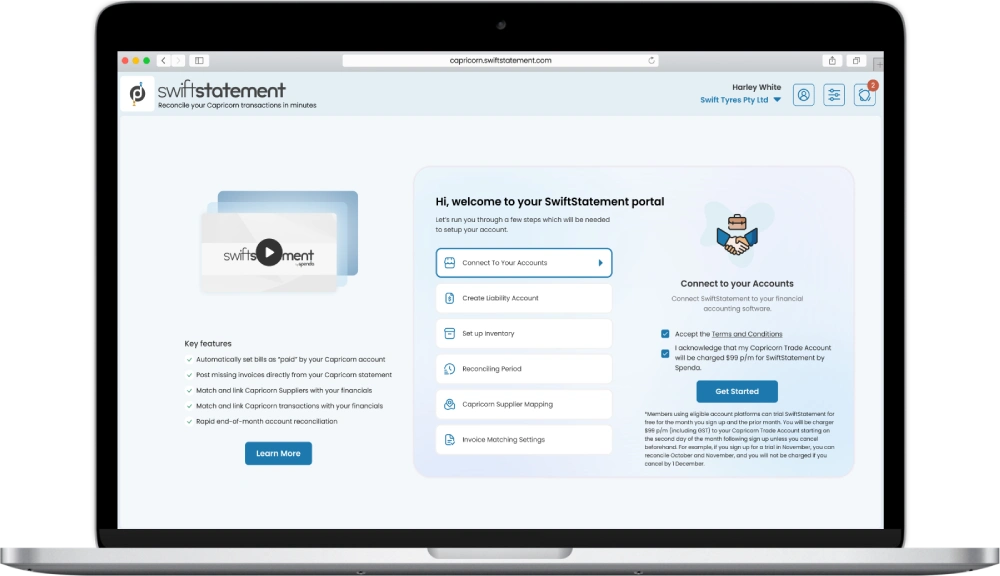
Get started in a few easy steps
01
Access SwiftStatement via your myCAP portal.
02
Choose an option: request more info, book an assisted session, or get set up at your own pace.
03
Once you are ready to create your account, you’ll need to accept the terms and conditions.
04
Connect your accounting system and sync your accounts payable ledger.
05
Follow the on-screen prompts to complete your account set up.
Frequently asked questions
What is SwiftStatement?
SwiftStatement is an integrated tool designed to make managing, matching, and reconciling transactions quick and stress-free. The software automates the transaction matching process and syncs directly with your cloud accounting system.
How do I get started with SwiftStatement?
To get started, log into myCap with your Member ID and password and click on the SwiftStatement icon or banner. You will then be presented with three options to choose from:
- Request a callback for more information on SwiftStatement.
- Book an appointment with Spenda to help set up SwiftStatement.
- Get started now and set up SwiftStatement.
Once you are ready to create an account*, you will need to:
- Accept the Terms and Conditions
- Link your accounting software
- Follow the on-screen prompts to complete your account setup
*Note: Account set up can be done either with assistance from a Spenda onboarding specialist or through a self-guided forma
Can Capricorn see any invoices outside of my Capricorn Trade Account?
No they can’t. All your invoices will be read into Spenda but any transactions that are not linked to your Capricorn Trade Account are not visible to Capricorn Society.
How far back can I look to reconcile our Capricorn data?
You have the flexibility to reconcile any period you choose, and we can assist with records going back as far as your July 2024 statement.
Can I make our end of month payment to Capricorn through Spenda?
Not at the moment. Spenda is designed to speed up and simplify the reconciliation of your Capricorn Statements. Invoice payments will still need to be made using your usual method.
By using Spenda, will I need to change the way I process invoices?
Not at all. Spenda is designed to be flexible and adaptable to your existing practices. We can handle just the reconciliation, or we can assist with integrating invoices into your financial software.
What financial software does Spenda support?
Currently, our SwiftStatement solution can quickly integrate with Xero and MYOB.
Can I choose a different purchase account for inventory postings?
Yes, you can create custom posting items to map to suppliers and select the purchase account that best suits your needs.
Can I change the purchase account after setting the default posting?
Yes absolutely. You will just need to go back into your financial software and change the purchase account for future postings.
Can I make changes to invoices once they have been posted to the Capricorn Liability Account?
Yes, you can make changes such as altering the reference number, item, and description. However, we advise against changing invoice amounts unless it’s necessary to match the Capricorn transaction.
How much does SwiftStatement cost?
Members using eligible accounting platforms can trial SwiftStatement by accessing their data for free for the month you sign up and the prior month. You will be charged $99 p/m (including GST) to your Capricorn Trade Account starting on the second day of the month following sign up unless you cancel beforehand. For example, if you sign up for a trial in April, you can reconcile March and April, and you will not be charged if you cancel by 1 May.